Dev AI Risk sanity check
In July 2025, Replit’s AI tool wiped out production databases. They called it a “catastrophic failure.”
And they’re not alone. More developers are plugging AI into dev pipelines without asking:
“What could go wrong — and how can we tell if we’re taking on excessive AI development risk?”
If you're using AI tools to help write code — or even just autocomplete — then this blog is for you.
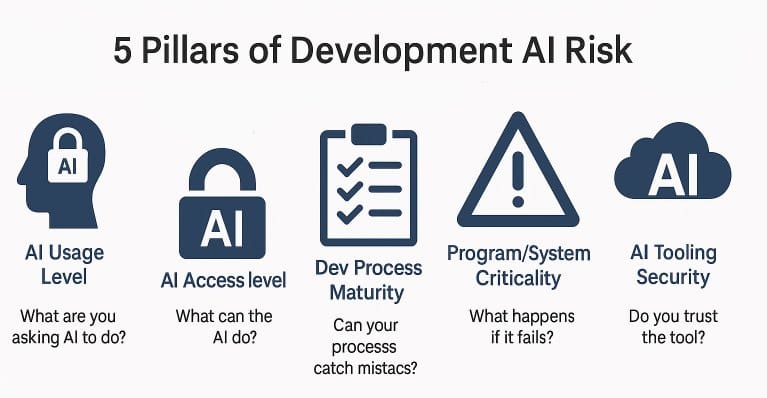
The 5-Pillar DEV AI Re:Cyberist Sanity Check
Go through the following five pillars and note which tier applies in your environment. Evaluate the risks at each pillar — and remember, multiple Tier 3s can quickly stack into real-world failure.
Variation between pillars is to be expected across different projects, systems, and teams. Different use cases call for different levels of security — the goal is to be intentional, not uniform.
Each pillar represents a different axis of AI development risk — not overlapping categories, but independent dimensions. Tiering within each pillar gives you a structured way to build a composite view of your overall risk posture.
| Tier | Risk level | Meaning |
|---|---|---|
| 1 | Low | Low-impact AI usage area, e.g.isolated & assistive |
| 2 | Medium | Broader AI use with moderate exposure, risk could accumulate |
| 3 | High | Could be source of a critical AI risks if not mitigated |
1. What are you asking AI to do?
- Tier 1: Help with Learning
- Tier 2: Autocomplete only
- Tier 3: Full AI/"vibe" coding
The more decisions the AI makes for you, the more trust you're extending — and the more risk you're accepting. It's also easier to miss something when AI is doing more: generating large outputs across multiple files that are hard to review manually.
2. What can the AI see, influence or change?
- Tier 1: Isolated and sandboxed.
- Tier 2: Read-only /Ask-first / least privilege access / assistan mode
- Tier 3: Trusted agent with full, wide access — “Yolo mode (or similar)” or MCP-style extensions enabled
Most current tools run with developer-level rights. Whatever the developer can see or do, the AI likely can too. And this goes far beyond code: the AI might update servers, check live data feeds, manage your M365 tenant, or even act as your database admin.
Under normal conditions, you’d never grant a single human that much access. Why give it to a tool you barely control?
3. Can your process catch mistakes?
- Tier 1: Maturity level: Improving
- Tier 2: Maturity level: Documented
- Tier 3: Maturity level: Ad Hoc or low
AI makes mistakes — just like any human would. The real question is: do you have a pipeline that will catch those mistakes before they hit production?
And if something slips through, can you recover from a production-wide disaster?
This isn’t just an “AI control” issue — it’s classic software quality assurance and business continuity.
4. What happens if it fails?
- Tier 1: “If it breaks or leaks, No big deal”
- Tier 2: “If it fails, people notice — but it’s manageable.”
- Tier 3: “If this goes wrong, we’re legally, financially, or reputationally exposed.”
The more critical the system, the less room you have for AI error. A good baseline rule: limit AI to the dev environment, and keep it isolated from production. As your maturity improves, this assumption can be revisited — but early on, isolation is your friend.
5. Do you trust the tool?
- Tier 1: Audited, enterprise-grade
- Tier 2: Commercial, limited security controls (Note majority of commercial AI tools are currently in this category — not in Tier 1.)
- Tier 3: Quick-hack internal, experimental, or custom tools sourced from the internet (e.g., GitHub) without proper review
AI tools often enter our environments quietly — through IDE extensions, helper scripts, or browser plugins. And yet, these tools now operate inside your dev pipeline, your IDE, and in some cases, your production automation.
Also note: AI-specific marketplaces are increasingly targeted by criminal groups.
That “just a harmless VS Code AI highlighter” you installed could compromise your entire enterprise security posture. This isn’t a hypothetical.
🎯 Example: Open-source Cursor AI plugin turned into a crypto-heist tool (SecureList)
When you install AI tooling or installing extensions you're not just adopting features — you're importing a new trust boundary. Treat it with the same scrutiny you'd give to any dependency running inside your core systems.
Conclusion
This sanity check isn’t here to stop you from using AI — it’s here to help you use it responsibly, and to minimize the risk of Replit-style disasters in your own environment.
One Tier 3 pillar? Maybe fine. Multiple Tier 3s? You might be asking for trouble.
Use this as a quick, first-line sanity check.
We believe AI is the future — but let’s make it a secure, resilient, and well-governed one.
P.S.
This sanity check is a lite version of our in-house AIRTIGHT AI Risk Framework — the structured model we use at Re:Cyberist to assess real-world AI integration risks.
AIRTIGHT = Access • Integration • Risk Surface • Trust Level • Impact • Guardrails • Human Oversight • Threat Profile — covering everything from access control to human oversight.